About PrismONE
The PrismOne mobile app gives you full access to your payroll and HR information - anytime you need it, on any device you choose. Easily see your pay stubs, check your PTO balance, view your benefits, or review tax...
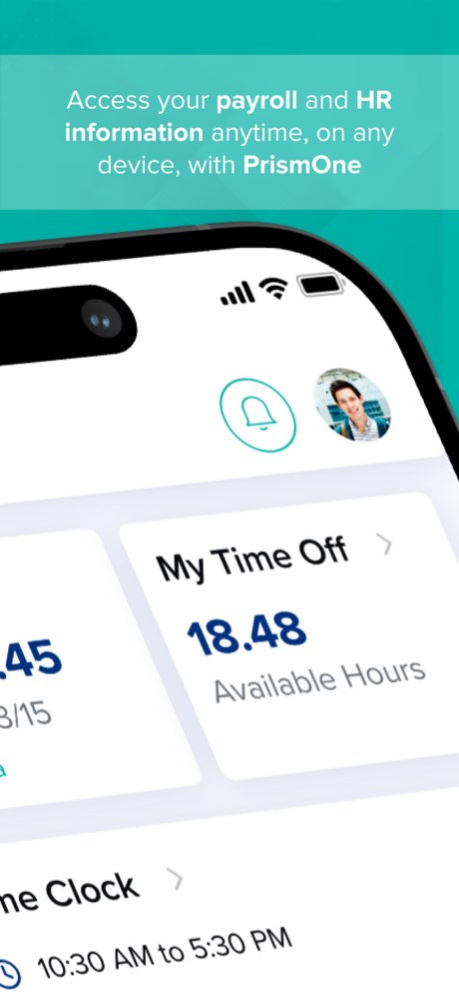
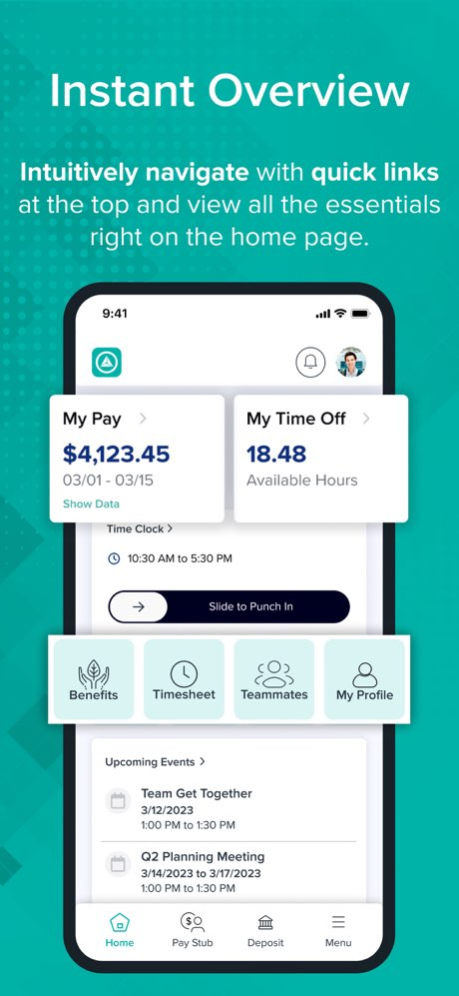
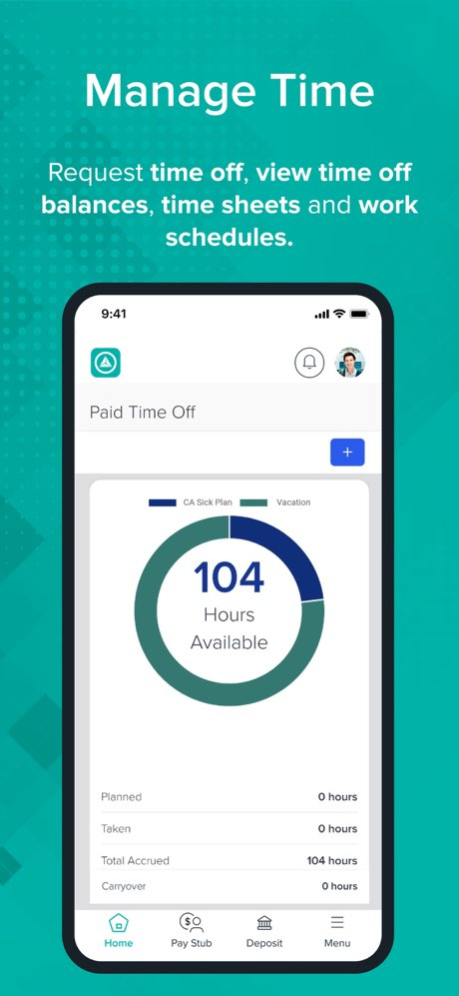
The PrismOne mobile app gives you full access to your payroll and HR information - anytime you need it, on any device you choose. Easily see your pay stubs, check your PTO balance, view your benefits, or review tax documents from your mobile device. And that's just the beginning. Manage your work life efficiently. For Employees: . Intuitively navigate with quick links at the top and view all the essentials right on the home page. . Request time off, view time off balances, time sheets and work schedules. . Find your teammates through the convenient org chart and directory. . View pay stubs and pay history easily. . Enroll in benefits and view benefits summary. . Access HR and tax documents such as W-2s. . Clock in/out effortlessly with one swipe (if applicable). . Locate your internal HR support contacts quickly. For Managers: . See a high-level overview of employee onboarding activities. . Review pending PTO requests and approve quickly. . Access your team’s work schedules and timecards effortlessly. . View your team’s employee details and manage efficiently. . Gain access to a range of additional management features. Enjoy the streamlined HR and payroll experience with PrismOne mobile app. Everything you can do in the employee portal, you can now do on the go. Download the app today for a convenient, efficient, and user-friendly experience. The PrismOne mobile app is available to all PrismHR customers and their employees.
Version History Minor bug fixes 1.31.41 Aug 17 Geo-location feature enhancements for HCM, improvements to In-App Notifications, and minor bug fixes. 1.30.40 Jul 23 Minor bugfixes 1.29.37 Jun 21 Minor bugfixes 1.26.34 Apr 28 Bug fixes and enhancements, including support for document PDFs, push notification history, and Dark Mode QR code scan support 1.25.33 Apr 13 Minor bug fixes and improvements 1.24.31 Feb 11 Minor Bugfixes and enhancements 1.23.29 12/09/2025 PrismONE ID (SSO Login): Sign in faster and more securely with your PrismONE ID. Push Notifications: Get instant updates and alerts. Enhancements & Fixes: Improved performance and minor bug fixes for a smoother experience. 1.22.28 10/29/2025 Introduced a new feature to set a maximum number of invalid PIN attempts, enhancing overall security. Improved the web experience with several usability and interface enhancements. Addressed various bugs and implemented performance optimizations for a smoother user experience. 1.21.27 09/10/2025 Important bug fixes and hot-fix to improve stability and performance Minor issue resolutions for a smoother user experience 1.20.25 07/16/2025 We’ve made some important updates to improve your experience: Bug Fixes: We’ve squashed a few bugs to make the app smoother and more reliable. Updated SignOut Flow: Users no longer need to scan the QR code again after signing out, making re-login easier. 1.19.24 07/14/2025 We’re excited to bring you the latest enhancements and fixes to improve your experience with the PrismONE Mobile app: New: 'My Messages' Widget Stay up to date with important communications! The new 'My Messages' widget is now available. Smarter UI: Event Widget Visibility No more empty screens — the 'My Events' widget will now be hidden if there are no upcoming events to display, keeping your dashboard clean and relevant. Fix: Compatibility with Marketplace Partners Resolved an issue that was preventing the app from working properly with key marketplace partners. 1.18.23 05/21/2025 We’ve made some solid improvements to enhance your experience: SSO Links Support – Now you can open and handle Single Sign-On (SSO) links directly from the app. Easier access, faster login. Request PTO on the Go – You can now request Time Off right from the mobile app Minor Fixes & Improvements – We’ve squashed a few bugs and made performance enhancements under the hood. Update now to get the latest! 1.17.22 04/17/2025 New Features: Enhanced User Interface: We've added several new UI screens to improve your navigation and overall app experience for EP portal users Bug Fixes: Minor Bug Fixes: Addressed various minor issues to enhance app stability and performance. 1.16.20 03/10/2025 Minor updates to QR Code Scan and few bug fixes 1.15.19 02/16/2025 This release focuses on: 1. Improved application stability and performance for a smoother and more reliable experience. 2. Minor bug fixes to address and resolve small issues for better functionality. 1.14 02/06/2025 Enhanced Application Stability and Resolved minor Bug 1.13 01/26/2025 The Manager Module is now enabled for HCM customers. Enhancements for improved app stability. Minor bug fixes. 1.12.16 01/19/2025 New "Full Portal" mode is added for Prism Core user and minor bug fixes. 1.10.13 11/25/2024 Key Updates and Features: Widgets: My Approvals Widget Onboarding Widget SSO URL Navigation Enhancements: Quick Nav Widget Header & Footer Quick Nav Options Native Navigation User Interface Updates: Quick Nav Tile Color Update Login - QR Code Scanning Mobile Header & Dashboard Redesign My Pay & My Time Off Redesign Notification Enhancements: Core & HCM Notification UI Screen Update Technical Updates: Upgrade .NET Framework to .Net 8. 1.9.11 10/25/2024 This hotfix release includes important updates to support recent API URL change in the Prism HCM platform. 1.8 10/06/2024 Exciting Features in Prism Core Employee Experience Employee Benefits Plan: Easily access and manage your benefits, ensuring you make the most of what’s available to you. My Time Off (Available PTO): Track your paid time off effortlessly, helping you plan vacations and personal time with ease. Paystub: View and understand your pay statements in a clear and concise format, so you always know what to expect. Notifications: Stay updated with timely alerts for important information regarding your benefits, time off, and pay. 1.7 09/18/2024 Release Notes: - Fixed QR Code scanning issue 1.6 08/06/2024 Minor improvements and bug fixes 1.5 05/30/2024 Important Bug fixes 1.4 05/15/2024
Previous Versions
Here you can find the changelog of PrismONE since it was posted on our website on 2026-02-17 02:36:26.
The latest version is 1.31.41 and it was updated on 2026-10-12 21:05:50. See below the changes in each version.
PrismONE version 1.31.41
Updated At: 2026-10-08
Changes: Version History Minor bug fixes 1.31.41 Aug 17 Geo-location feature enhancements for HCM, improvements to In-App Notifications, and minor bug fixes. 1.30.40 Jul 23 Minor bugfixes 1.29.37 Jun 21 Minor bugfixes 1.26.34 Apr 28 Bug fixes and enhancements, including support for document PDFs, push notification history, and Dark Mode QR code scan support 1.25.33 Apr 13 Minor bug fixes and improvements 1.24.31 Feb 11 Minor Bugfixes and enhancements 1.23.29 12/09/2025 PrismONE ID (SSO Login): Sign in faster and more securely with your PrismONE ID.
Push Notifications: Get instant updates and alerts.
Enhancements & Fixes: Improved performance and minor bug fixes for a smoother experience. 1.22.28 10/29/2025 Introduced a new feature to set a maximum number of invalid PIN attempts, enhancing overall security.
Improved the web experience with several usability and interface enhancements.
Addressed various bugs and implemented performance optimizations for a smoother user experience. 1.21.27 09/10/2025 Important bug fixes and hot-fix to improve stability and performance
Minor issue resolutions for a smoother user experience 1.20.25 07/16/2025 We’ve made some important updates to improve your experience:
Bug Fixes: We’ve squashed a few bugs to make the app smoother and more reliable.
Updated SignOut Flow: Users no longer need to scan the QR code again after signing out, making re-login easier. 1.19.24 07/14/2025 We’re excited to bring you the latest enhancements and fixes to improve your experience with the PrismONE Mobile app:
New: 'My Messages' Widget
Stay up to date with important communications! The new 'My Messages' widget is now available.
Smarter UI: Event Widget Visibility
No more empty screens — the 'My Events' widget will now be hidden if there are no upcoming events to display, keeping your dashboard clean and relevant.
Fix: Compatibility with Marketplace Partners
Resolved an issue that was preventing the app from working properly with key marketplace partners. 1.18.23 05/21/2025 We’ve made some solid improvements to enhance your experience:
SSO Links Support – Now you can open and handle Single Sign-On (SSO) links directly from the app. Easier access, faster login.
Request PTO on the Go – You can now request Time Off right from the mobile app
Minor Fixes & Improvements – We’ve squashed a few bugs and made performance enhancements under the hood.
Update now to get the latest! 1.17.22 04/17/2025 New Features:
Enhanced User Interface:
We've added several new UI screens to improve your navigation and overall app experience for EP portal users
Bug Fixes:
Minor Bug Fixes:
Addressed various minor issues to enhance app stability and performance. 1.16.20 03/10/2025 Minor updates to QR Code Scan and few bug fixes 1.15.19 02/16/2025 This release focuses on:
1. Improved application stability and performance for a smoother and more reliable experience.
2. Minor bug fixes to address and resolve small issues for better functionality. 1.14 02/06/2025 Enhanced Application Stability and Resolved minor Bug 1.13 01/26/2025 The Manager Module is now enabled for HCM customers.
Enhancements for improved app stability.
Minor bug fixes. 1.12.16 01/19/2025 New "Full Portal" mode is added for Prism Core user and minor bug fixes. 1.10.13 11/25/2024 Key Updates and Features:
Widgets:
My Approvals Widget
Onboarding Widget SSO URL
Navigation Enhancements:
Quick Nav Widget
Header & Footer Quick Nav Options
Native Navigation
User Interface Updates:
Quick Nav Tile Color Update
Login - QR Code Scanning
Mobile Header & Dashboard Redesign
My Pay & My Time Off Redesign
Notification Enhancements:
Core & HCM Notification UI Screen Update
Technical Updates:
Upgrade .NET Framework to .Net 8. 1.9.11 10/25/2024 This hotfix release includes important updates to support recent API URL change in the Prism HCM platform. 1.8 10/06/2024 Exciting Features in Prism Core Employee Experience
Employee Benefits Plan: Easily access and manage your benefits, ensuring you make the most of what’s available to you.
My Time Off (Available PTO): Track your paid time off effortlessly, helping you plan vacations and personal time with ease.
Paystub: View and understand your pay statements in a clear and concise format, so you always know what to expect.
Notifications: Stay updated with timely alerts for important information regarding your benefits, time off, and pay. 1.7 09/18/2024 Release Notes:
- Fixed QR Code scanning issue 1.6 08/06/2024 Minor improvements and bug fixes 1.5 05/30/2024 Important Bug fixes 1.4 05/15/2024
PrismONE version 1.31.41
Updated At: 2026-08-21
Changes: Version History Minor bug fixes 1.31.41 4d ago Geo-location feature enhancements for HCM, improvements to In-App Notifications, and minor bug fixes. 1.30.40 Jul 23 Minor bugfixes 1.29.37 Jun 21 Minor bugfixes 1.26.34 Apr 28 Bug fixes and enhancements, including support for document PDFs, push notification history, and Dark Mode QR code scan support 1.25.33 Apr 13 Minor bug fixes and improvements 1.24.31 Feb 11 Minor Bugfixes and enhancements 1.23.29 12/09/2025 PrismONE ID (SSO Login): Sign in faster and more securely with your PrismONE ID.
Push Notifications: Get instant updates and alerts.
Enhancements & Fixes: Improved performance and minor bug fixes for a smoother experience. 1.22.28 10/29/2025 Introduced a new feature to set a maximum number of invalid PIN attempts, enhancing overall security.
Improved the web experience with several usability and interface enhancements.
Addressed various bugs and implemented performance optimizations for a smoother user experience. 1.21.27 09/10/2025 Important bug fixes and hot-fix to improve stability and performance
Minor issue resolutions for a smoother user experience 1.20.25 07/16/2025 We’ve made some important updates to improve your experience:
Bug Fixes: We’ve squashed a few bugs to make the app smoother and more reliable.
Updated SignOut Flow: Users no longer need to scan the QR code again after signing out, making re-login easier. 1.19.24 07/14/2025 We’re excited to bring you the latest enhancements and fixes to improve your experience with the PrismONE Mobile app:
New: 'My Messages' Widget
Stay up to date with important communications! The new 'My Messages' widget is now available.
Smarter UI: Event Widget Visibility
No more empty screens — the 'My Events' widget will now be hidden if there are no upcoming events to display, keeping your dashboard clean and relevant.
Fix: Compatibility with Marketplace Partners
Resolved an issue that was preventing the app from working properly with key marketplace partners. 1.18.23 05/21/2025 We’ve made some solid improvements to enhance your experience:
SSO Links Support – Now you can open and handle Single Sign-On (SSO) links directly from the app. Easier access, faster login.
Request PTO on the Go – You can now request Time Off right from the mobile app
Minor Fixes & Improvements – We’ve squashed a few bugs and made performance enhancements under the hood.
Update now to get the latest! 1.17.22 04/17/2025 New Features:
Enhanced User Interface:
We've added several new UI screens to improve your navigation and overall app experience for EP portal users
Bug Fixes:
Minor Bug Fixes:
Addressed various minor issues to enhance app stability and performance. 1.16.20 03/10/2025 Minor updates to QR Code Scan and few bug fixes 1.15.19 02/16/2025 This release focuses on:
1. Improved application stability and performance for a smoother and more reliable experience.
2. Minor bug fixes to address and resolve small issues for better functionality. 1.14 02/06/2025 Enhanced Application Stability and Resolved minor Bug 1.13 01/26/2025 The Manager Module is now enabled for HCM customers.
Enhancements for improved app stability.
Minor bug fixes. 1.12.16 01/19/2025 New "Full Portal" mode is added for Prism Core user and minor bug fixes. 1.10.13 11/25/2024 Key Updates and Features:
Widgets:
My Approvals Widget
Onboarding Widget SSO URL
Navigation Enhancements:
Quick Nav Widget
Header & Footer Quick Nav Options
Native Navigation
User Interface Updates:
Quick Nav Tile Color Update
Login - QR Code Scanning
Mobile Header & Dashboard Redesign
My Pay & My Time Off Redesign
Notification Enhancements:
Core & HCM Notification UI Screen Update
Technical Updates:
Upgrade .NET Framework to .Net 8. 1.9.11 10/25/2024 This hotfix release includes important updates to support recent API URL change in the Prism HCM platform. 1.8 10/06/2024 Exciting Features in Prism Core Employee Experience
Employee Benefits Plan: Easily access and manage your benefits, ensuring you make the most of what’s available to you.
My Time Off (Available PTO): Track your paid time off effortlessly, helping you plan vacations and personal time with ease.
Paystub: View and understand your pay statements in a clear and concise format, so you always know what to expect.
Notifications: Stay updated with timely alerts for important information regarding your benefits, time off, and pay. 1.7 09/18/2024 Release Notes:
- Fixed QR Code scanning issue 1.6 08/06/2024 Minor improvements and bug fixes 1.5 05/30/2024 Important Bug fixes 1.4 05/15/2024
PrismONE version 1.30.40
Updated At: 2026-07-24
Changes: Version History Geo-location feature enhancements for HCM, improvements to In-App Notifications, and minor bug fixes. 1.30.40 1d ago Minor bugfixes 1.29.37 Jun 21 Minor bugfixes 1.26.34 Apr 28 Bug fixes and enhancements, including support for document PDFs, push notification history, and Dark Mode QR code scan support 1.25.33 Apr 13 Minor bug fixes and improvements 1.24.31 Feb 11 Minor Bugfixes and enhancements 1.23.29 12/09/2025 PrismONE ID (SSO Login): Sign in faster and more securely with your PrismONE ID.
Push Notifications: Get instant updates and alerts.
Enhancements & Fixes: Improved performance and minor bug fixes for a smoother experience. 1.22.28 10/29/2025 Introduced a new feature to set a maximum number of invalid PIN attempts, enhancing overall security.
Improved the web experience with several usability and interface enhancements.
Addressed various bugs and implemented performance optimizations for a smoother user experience. 1.21.27 09/10/2025 Important bug fixes and hot-fix to improve stability and performance
Minor issue resolutions for a smoother user experience 1.20.25 07/16/2025 We’ve made some important updates to improve your experience:
Bug Fixes: We’ve squashed a few bugs to make the app smoother and more reliable.
Updated SignOut Flow: Users no longer need to scan the QR code again after signing out, making re-login easier. 1.19.24 07/14/2025 We’re excited to bring you the latest enhancements and fixes to improve your experience with the PrismONE Mobile app:
New: 'My Messages' Widget
Stay up to date with important communications! The new 'My Messages' widget is now available.
Smarter UI: Event Widget Visibility
No more empty screens — the 'My Events' widget will now be hidden if there are no upcoming events to display, keeping your dashboard clean and relevant.
Fix: Compatibility with Marketplace Partners
Resolved an issue that was preventing the app from working properly with key marketplace partners. 1.18.23 05/21/2025 We’ve made some solid improvements to enhance your experience:
SSO Links Support – Now you can open and handle Single Sign-On (SSO) links directly from the app. Easier access, faster login.
Request PTO on the Go – You can now request Time Off right from the mobile app
Minor Fixes & Improvements – We’ve squashed a few bugs and made performance enhancements under the hood.
Update now to get the latest! 1.17.22 04/17/2025 New Features:
Enhanced User Interface:
We've added several new UI screens to improve your navigation and overall app experience for EP portal users
Bug Fixes:
Minor Bug Fixes:
Addressed various minor issues to enhance app stability and performance. 1.16.20 03/10/2025 Minor updates to QR Code Scan and few bug fixes 1.15.19 02/16/2025 This release focuses on:
1. Improved application stability and performance for a smoother and more reliable experience.
2. Minor bug fixes to address and resolve small issues for better functionality. 1.14 02/06/2025 Enhanced Application Stability and Resolved minor Bug 1.13 01/26/2025 The Manager Module is now enabled for HCM customers.
Enhancements for improved app stability.
Minor bug fixes. 1.12.16 01/19/2025 New "Full Portal" mode is added for Prism Core user and minor bug fixes. 1.10.13 11/25/2024 Key Updates and Features:
Widgets:
My Approvals Widget
Onboarding Widget SSO URL
Navigation Enhancements:
Quick Nav Widget
Header & Footer Quick Nav Options
Native Navigation
User Interface Updates:
Quick Nav Tile Color Update
Login - QR Code Scanning
Mobile Header & Dashboard Redesign
My Pay & My Time Off Redesign
Notification Enhancements:
Core & HCM Notification UI Screen Update
Technical Updates:
Upgrade .NET Framework to .Net 8. 1.9.11 10/25/2024 This hotfix release includes important updates to support recent API URL change in the Prism HCM platform. 1.8 10/06/2024 Exciting Features in Prism Core Employee Experience
Employee Benefits Plan: Easily access and manage your benefits, ensuring you make the most of what’s available to you.
My Time Off (Available PTO): Track your paid time off effortlessly, helping you plan vacations and personal time with ease.
Paystub: View and understand your pay statements in a clear and concise format, so you always know what to expect.
Notifications: Stay updated with timely alerts for important information regarding your benefits, time off, and pay. 1.7 09/18/2024 Release Notes:
- Fixed QR Code scanning issue 1.6 08/06/2024 Minor improvements and bug fixes 1.5 05/30/2024 Important Bug fixes 1.4 05/15/2024 QR code updates and minor bug fixes 1.2 05/11/2024
PrismONE version 1.29.37
Updated At: 2026-07-07
Changes: Version History Minor bugfixes 1.29.37 Jun 21 Minor bugfixes 1.26.34 Apr 28 Bug fixes and enhancements, including support for document PDFs, push notification history, and Dark Mode QR code scan support 1.25.33 Apr 13 Minor bug fixes and improvements 1.24.31 Feb 11 Minor Bugfixes and enhancements 1.23.29 12/09/2025 PrismONE ID (SSO Login): Sign in faster and more securely with your PrismONE ID.
Push Notifications: Get instant updates and alerts.
Enhancements & Fixes: Improved performance and minor bug fixes for a smoother experience. 1.22.28 10/29/2025 Introduced a new feature to set a maximum number of invalid PIN attempts, enhancing overall security.
Improved the web experience with several usability and interface enhancements.
Addressed various bugs and implemented performance optimizations for a smoother user experience. 1.21.27 09/10/2025 Important bug fixes and hot-fix to improve stability and performance
Minor issue resolutions for a smoother user experience 1.20.25 07/16/2025 We’ve made some important updates to improve your experience:
Bug Fixes: We’ve squashed a few bugs to make the app smoother and more reliable.
Updated SignOut Flow: Users no longer need to scan the QR code again after signing out, making re-login easier. 1.19.24 07/14/2025 We’re excited to bring you the latest enhancements and fixes to improve your experience with the PrismONE Mobile app:
New: 'My Messages' Widget
Stay up to date with important communications! The new 'My Messages' widget is now available.
Smarter UI: Event Widget Visibility
No more empty screens — the 'My Events' widget will now be hidden if there are no upcoming events to display, keeping your dashboard clean and relevant.
Fix: Compatibility with Marketplace Partners
Resolved an issue that was preventing the app from working properly with key marketplace partners. 1.18.23 05/21/2025 We’ve made some solid improvements to enhance your experience:
SSO Links Support – Now you can open and handle Single Sign-On (SSO) links directly from the app. Easier access, faster login.
Request PTO on the Go – You can now request Time Off right from the mobile app
Minor Fixes & Improvements – We’ve squashed a few bugs and made performance enhancements under the hood.
Update now to get the latest! 1.17.22 04/17/2025 New Features:
Enhanced User Interface:
We've added several new UI screens to improve your navigation and overall app experience for EP portal users
Bug Fixes:
Minor Bug Fixes:
Addressed various minor issues to enhance app stability and performance. 1.16.20 03/10/2025 Minor updates to QR Code Scan and few bug fixes 1.15.19 02/16/2025 This release focuses on:
1. Improved application stability and performance for a smoother and more reliable experience.
2. Minor bug fixes to address and resolve small issues for better functionality. 1.14 02/06/2025 Enhanced Application Stability and Resolved minor Bug 1.13 01/26/2025 The Manager Module is now enabled for HCM customers.
Enhancements for improved app stability.
Minor bug fixes. 1.12.16 01/19/2025 New "Full Portal" mode is added for Prism Core user and minor bug fixes. 1.10.13 11/25/2024 Key Updates and Features:
Widgets:
My Approvals Widget
Onboarding Widget SSO URL
Navigation Enhancements:
Quick Nav Widget
Header & Footer Quick Nav Options
Native Navigation
User Interface Updates:
Quick Nav Tile Color Update
Login - QR Code Scanning
Mobile Header & Dashboard Redesign
My Pay & My Time Off Redesign
Notification Enhancements:
Core & HCM Notification UI Screen Update
Technical Updates:
Upgrade .NET Framework to .Net 8. 1.9.11 10/25/2024 This hotfix release includes important updates to support recent API URL change in the Prism HCM platform. 1.8 10/06/2024 Exciting Features in Prism Core Employee Experience
Employee Benefits Plan: Easily access and manage your benefits, ensuring you make the most of what’s available to you.
My Time Off (Available PTO): Track your paid time off effortlessly, helping you plan vacations and personal time with ease.
Paystub: View and understand your pay statements in a clear and concise format, so you always know what to expect.
Notifications: Stay updated with timely alerts for important information regarding your benefits, time off, and pay. 1.7 09/18/2024 Release Notes:
- Fixed QR Code scanning issue 1.6 08/06/2024 Minor improvements and bug fixes 1.5 05/30/2024 Important Bug fixes 1.4 05/15/2024 QR code updates and minor bug fixes 1.2 05/11/2024 Fixed minor issues 1.1 05/04/2024
PrismONE version 1.26.34
Updated At: 2026-06-02
Changes: Version History Minor bugfixes 1.26.34 Apr 28 Bug fixes and enhancements, including support for document PDFs, push notification history, and Dark Mode QR code scan support 1.25.33 Apr 13 Minor bug fixes and improvements 1.24.31 Feb 11 Minor Bugfixes and enhancements 1.23.29 12/09/2025 PrismONE ID (SSO Login): Sign in faster and more securely with your PrismONE ID.
Push Notifications: Get instant updates and alerts.
Enhancements & Fixes: Improved performance and minor bug fixes for a smoother experience. 1.22.28 10/29/2025 Introduced a new feature to set a maximum number of invalid PIN attempts, enhancing overall security.
Improved the web experience with several usability and interface enhancements.
Addressed various bugs and implemented performance optimizations for a smoother user experience. 1.21.27 09/10/2025 Important bug fixes and hot-fix to improve stability and performance
Minor issue resolutions for a smoother user experience 1.20.25 07/16/2025 We’ve made some important updates to improve your experience:
Bug Fixes: We’ve squashed a few bugs to make the app smoother and more reliable.
Updated SignOut Flow: Users no longer need to scan the QR code again after signing out, making re-login easier. 1.19.24 07/14/2025 We’re excited to bring you the latest enhancements and fixes to improve your experience with the PrismONE Mobile app:
New: 'My Messages' Widget
Stay up to date with important communications! The new 'My Messages' widget is now available.
Smarter UI: Event Widget Visibility
No more empty screens — the 'My Events' widget will now be hidden if there are no upcoming events to display, keeping your dashboard clean and relevant.
Fix: Compatibility with Marketplace Partners
Resolved an issue that was preventing the app from working properly with key marketplace partners. 1.18.23 05/21/2025 We’ve made some solid improvements to enhance your experience:
SSO Links Support – Now you can open and handle Single Sign-On (SSO) links directly from the app. Easier access, faster login.
Request PTO on the Go – You can now request Time Off right from the mobile app
Minor Fixes & Improvements – We’ve squashed a few bugs and made performance enhancements under the hood.
Update now to get the latest! 1.17.22 04/17/2025 New Features:
Enhanced User Interface:
We've added several new UI screens to improve your navigation and overall app experience for EP portal users
Bug Fixes:
Minor Bug Fixes:
Addressed various minor issues to enhance app stability and performance. 1.16.20 03/10/2025 Minor updates to QR Code Scan and few bug fixes 1.15.19 02/16/2025 This release focuses on:
1. Improved application stability and performance for a smoother and more reliable experience.
2. Minor bug fixes to address and resolve small issues for better functionality. 1.14 02/06/2025 Enhanced Application Stability and Resolved minor Bug 1.13 01/26/2025 The Manager Module is now enabled for HCM customers.
Enhancements for improved app stability.
Minor bug fixes. 1.12.16 01/19/2025 New "Full Portal" mode is added for Prism Core user and minor bug fixes. 1.10.13 11/25/2024 Key Updates and Features:
Widgets:
My Approvals Widget
Onboarding Widget SSO URL
Navigation Enhancements:
Quick Nav Widget
Header & Footer Quick Nav Options
Native Navigation
User Interface Updates:
Quick Nav Tile Color Update
Login - QR Code Scanning
Mobile Header & Dashboard Redesign
My Pay & My Time Off Redesign
Notification Enhancements:
Core & HCM Notification UI Screen Update
Technical Updates:
Upgrade .NET Framework to .Net 8. 1.9.11 10/25/2024 This hotfix release includes important updates to support recent API URL change in the Prism HCM platform. 1.8 10/06/2024 Exciting Features in Prism Core Employee Experience
Employee Benefits Plan: Easily access and manage your benefits, ensuring you make the most of what’s available to you.
My Time Off (Available PTO): Track your paid time off effortlessly, helping you plan vacations and personal time with ease.
Paystub: View and understand your pay statements in a clear and concise format, so you always know what to expect.
Notifications: Stay updated with timely alerts for important information regarding your benefits, time off, and pay. 1.7 09/18/2024 Release Notes:
- Fixed QR Code scanning issue 1.6 08/06/2024 Minor improvements and bug fixes 1.5 05/30/2024 Important Bug fixes 1.4 05/15/2024 QR code updates and minor bug fixes 1.2 05/11/2024 Fixed minor issues 1.1 05/04/2024 1.0 05/03/2024
PrismONE version 1.24.31
Updated At: 2026-02-11
Changes: Minor bug fixes and improvements
Disclaimer
Official App Store Link
We do not host PrismONE on our servers. We did not scan it for viruses, adware, spyware or other type of malware. This app is hosted by Apple and passed their terms and conditions to be listed there. We recommend caution when installing it.
The App Store link for PrismONE is provided to you by apps112.com without any warranties, representations or guarantees of any kind, so access it at your own risk.
If you have questions regarding this particular app contact the publisher directly. For questions about the functionalities of apps112.com contact us.